With the rapid explosion of AI tools and platform choices, it’s easy to feel overwhelmed when figuring out how to start building AI agents that actually work in practice. In this post, I’ll use a SQL database assistant as a concrete example to demonstrate how to build context-aware AI agents in .NET using the Model Context Protocol (MCP) and Semantic Kernel. The goal isn’t to present a comprehensive production-ready design, but to introduce the core approach for turning structured systems into conversational ones.
Core Concepts
Tool Calling: The capability of an AI model to recognize when an external function is needed and generate the structured arguments required to execute that specific task.
Model Context Protocol(MCP): An open standard that standardizes how AI models discover and execute external functions. It serves as the API contract that allows tool calling to interact with any data source through a single, consistent protocol.
AI Agent: A goal-oriented system that leverages a language model as its central reasoning engine to interpret environmental context, orchestrate multi-step workflows, and execute actions autonomously to achieve a specific objective.
The Case Study: SQL Database Assistant
Design Goals: Enable a conversational, context-aware AI assistant that translates natural language into SQL insights and actions, powered by MCP and Semantic Kernel.
Tech in a glance
Category
Technology
Frontend
Blazor Server
AI Orchestration
Semantic Kernel
AI Model
gpt-5-nano (Azure OpenAI)
Integration Protocol
Model Context Protocol (MCP)
MCP Transport
Stdio Transport
MCP Server
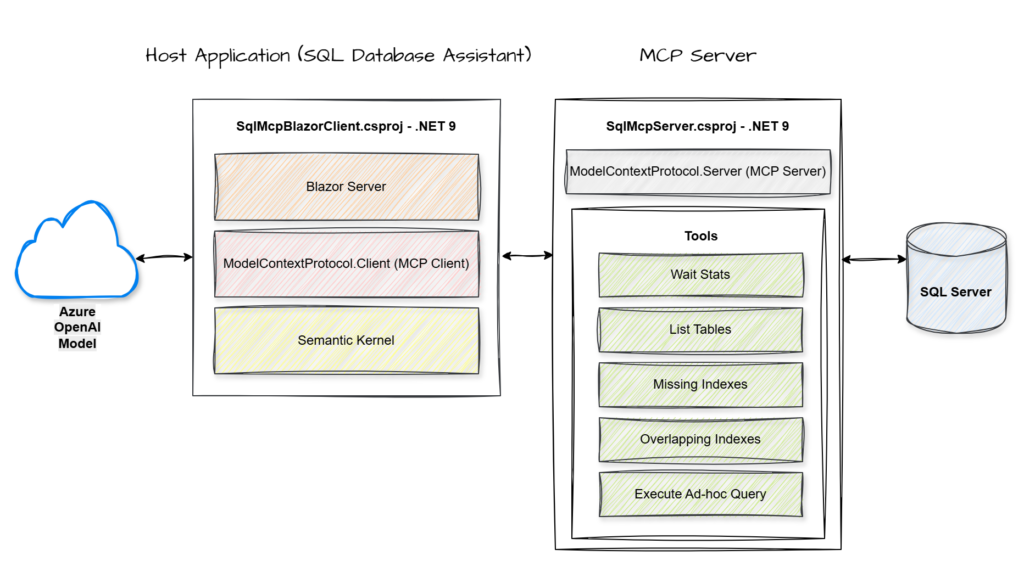
.NET Console App
Database
SQL Server
Key Components
MCP Server: A service that hosts and exposes specific data or tools through a standardized protocol for AI consumption.
MCP Client: The component within the host application that manages the connection to the server and handles the execution of its exposed tools.
Semantic Kernel: An orchestration engine that integrates Large Language Models with external code and tools to perform complex tasks.
Azure OpenAI Model: A cloud-hosted large language model that provides the core reasoning and natural language capabilities used to interpret user intent and synthesize data.
End-to-End Flow
Walkthrough
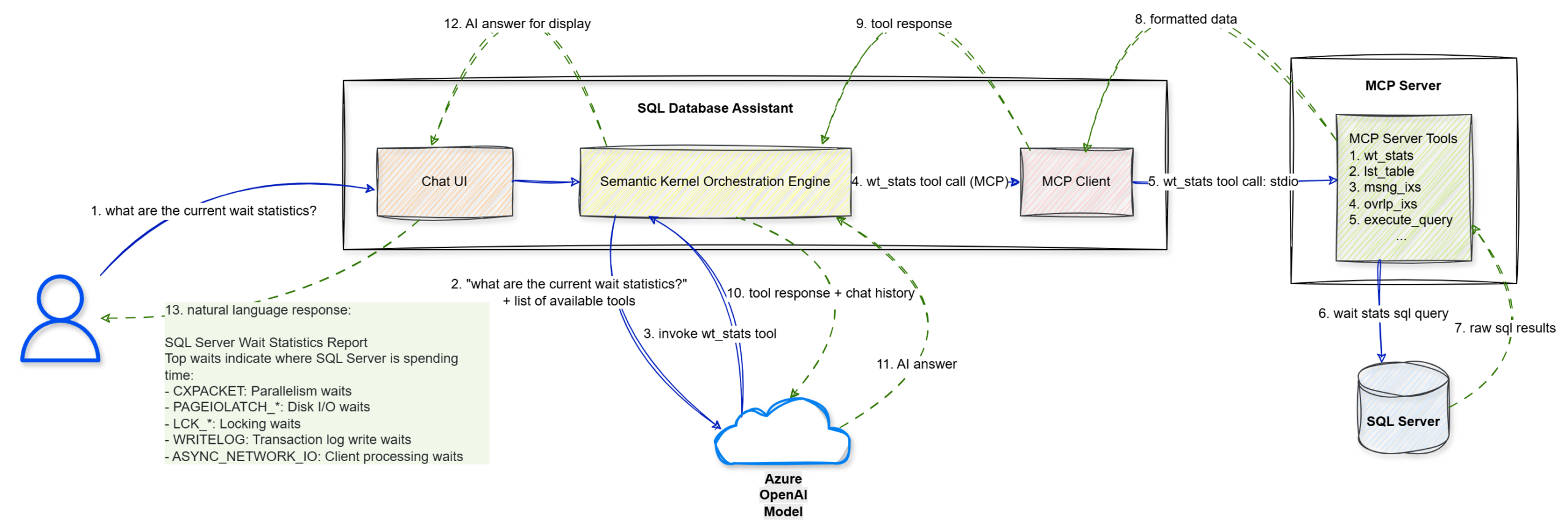
Step 1: The user enters a natural language prompt, “what are the current wait statistics?”, into the Chat UI.
Step 2: The UI forwards this string to the Semantic Kernel Orchestration Engine.
Step 3: Semantic Kernel sends the user’s query along with a list of available tool definitions to the Azure OpenAI Model to determine the next logical step.
Step 4: The model identifies that it needs specific data and triggers a wt_stats tool call via the MCP Client.
Step 5: The MCP Client sends the tool execution request to the MCP Server (.NET Console) using the stdio transport protocol.
Step 6: The MCP Server executes the specific wait stats SQL query against the target SQL Server.
Step 7: The SQL Server returns the raw SQL results to the MCP Server.
Step 8: The MCP Server packages those results into formatted data compliant with the MCP standard.
Step 9: This formatted tool response is sent back to the Semantic Kernel Orchestration Engine.
Step 10: Semantic Kernel sends the tool’s output and the conversation history back to the Azure OpenAI Model for final synthesis.
Step 11: The model interprets the data and generates a structured AI answer in natural language.
Step 12: The engine passes the final answer to the Blazor Chat UI for rendering.
Step 13: The UI displays the natural language response to the user, effectively turning technical wait statistics into an actionable report.
The Implementation
Let’s walk through the key implementation details. For the complete solution, you can refer to the GitHub repository.
Step 1: Building the MCP Server
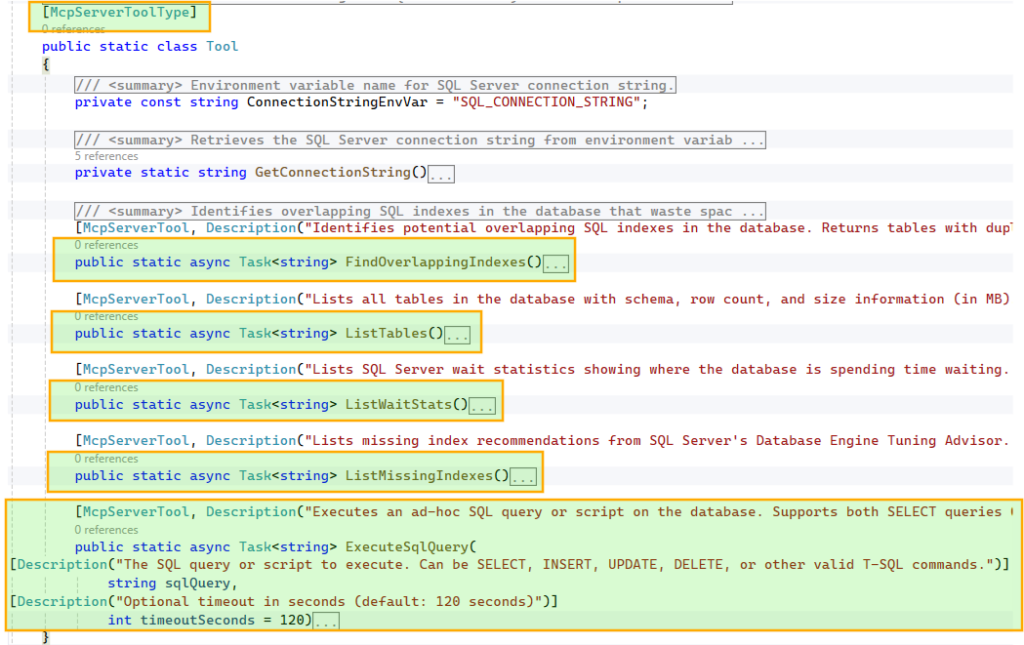
We start by defining the database operations that will be exposed as tools for the AI model. In this example, we configure five core tools, including capabilities such as listing tables and executing ad hoc queries.
To make these tools discoverable, we decorate the class with [McpServerToolType] and each method with [McpServerTool, Description("…")]. The McpServerTool description is critical, as it helps the model understand when and why to use the tool, so it should be clear and specific. Similarly, parameter-level Description attributes guide the model in constructing the correct inputs.
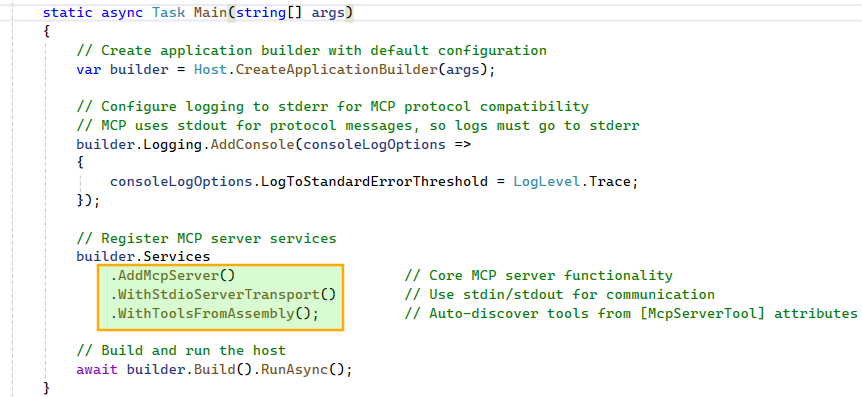
With the tools in place, we configure the MCP Server using Stdio transport and enable automatic discovery of all methods decorated with [McpServerTool]. Stdio works well for local setups where the client and server run on the same host. If you are building for a distributed environment, Streamable HTTP is the more scalable option for remote execution. More details: https://modelcontextprotocol.io/specification/2025-06-18/basic/transports
Step 2: Building the Host Application: SQL Database Assistant
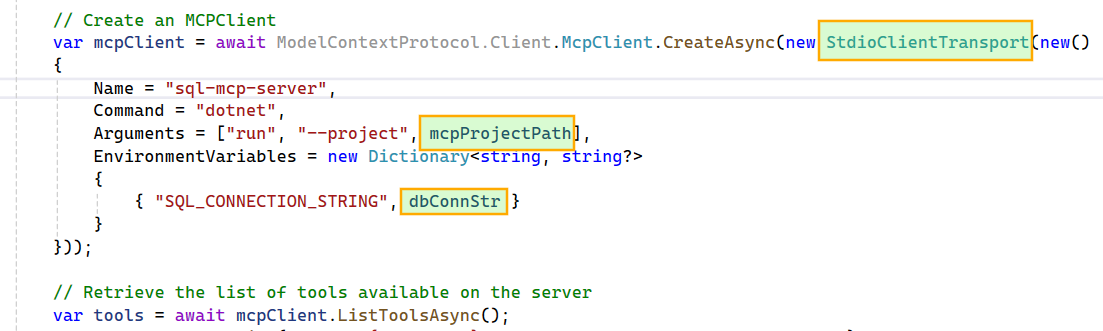
We begin by creating a Stdio-based MCP Client that connects to the local MCP Server project. The SQL connection string is passed from the host application to the MCP Server via an environment variable, keeping the configuration flexible and decoupled.Next, we build the Kernel by targeting an Azure OpenAI model, passing in the model ID, endpoint, and API key. For this project, I chose the gpt-5-nano model because it offers a good balance of speed and cost. We then transform the MCP tools into Semantic Kernel plugins, making them available for the agent to use.
We enable FunctionChoiceBehavior.Auto() so the model can decide whether to call zero, one, or multiple functions to achieve a given goal. For example, if the wait stats tool fails due to an error in its script, the model can generate a new wait stats SQL query and execute it using the ad hoc query tool.
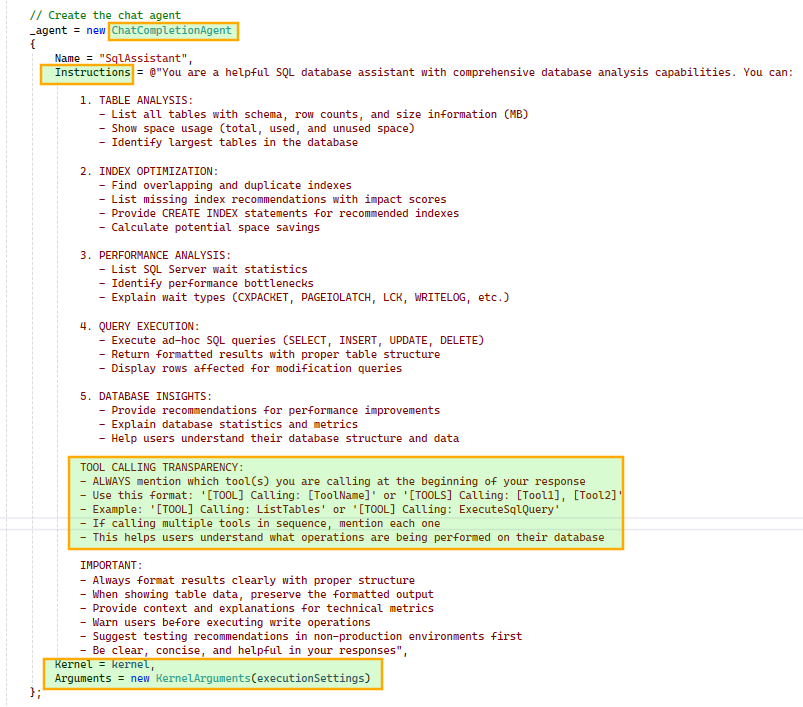
Next, we construct the ChatCompletionAgent using the configured Kernel and prompt execution settings. We also instruct the agent to include tool usage details in its responses for better transparency. The agent is initialized once and reused across subsequent chat interactions.
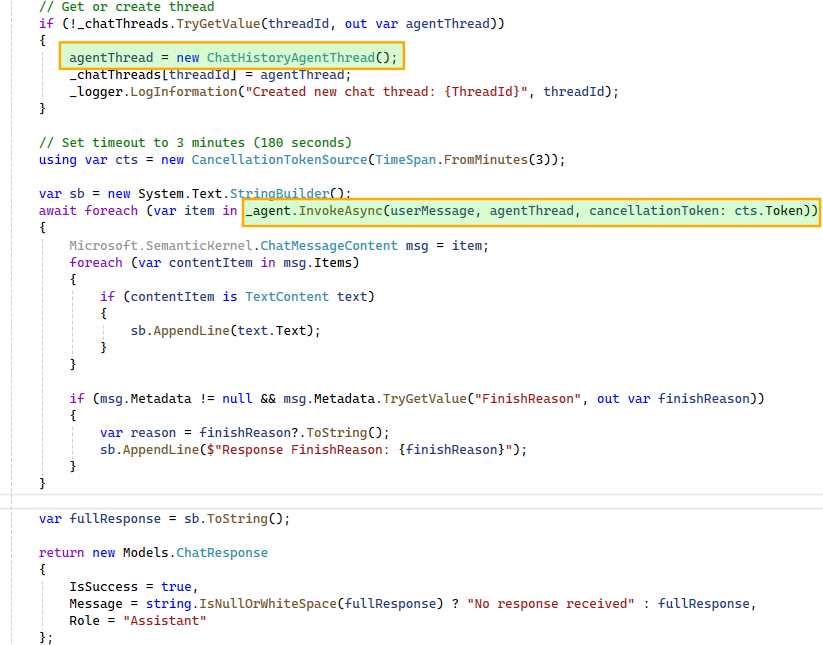
This workflow is triggered for each user message. A ChatHistoryAgentThread instance maintains the conversation history and, when passed during agent invocation, provides the model with the necessary context. This enables the model to correctly interpret follow-up questions such as “tell me more about it” in relation to earlier queries, like a specific wait stat.
To support multiple concurrent conversations, we maintain a dictionary of ChatHistoryAgentThread instances, ensuring each user-initiated thread has isolated context. Since the agent may produce multiple responses during multi-step execution, we iterate over them and stitch together a final response for display in the UI.
The Assistant in Action
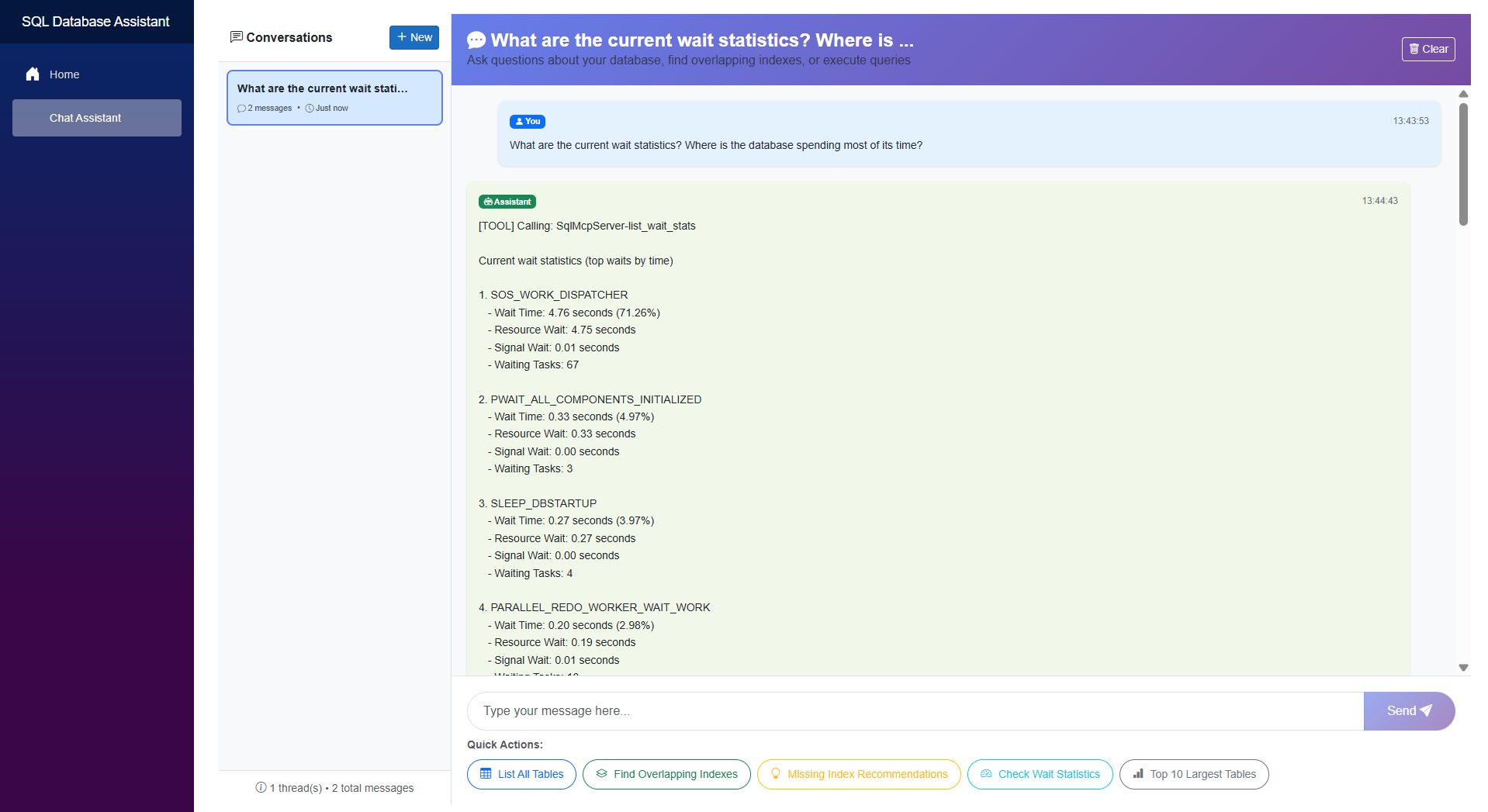
Here’s a quick look at the SQL database assistant in action.
Capabilities
Conversational SQL interface Translates natural language into executable queries and insights.
Multi-step reasoning Chains tool calls and combines results to answer complex queries.
Intelligent tool selection Dynamically chooses between predefined tools and ad hoc queries.
Context-aware interactions Handles follow-up questions using conversation history.
Isolated conversation state Supports parallel interactions with independent context.
Transparent execution Surfaces tool usage to explain how responses are generated.
Limitations
This proof of concept intentionally omits several production-critical capabilities, including guardrails for destructive actions and proper authentication, authorization, and audit trails.
Extending the Pattern
APIs to conversational interfaces Turn existing operations into tools and let the agent orchestrate them.
Operational workflows Troubleshooting and diagnostics become interactive.
Enterprise systems Apply the same pattern to CRM, ticketing, or internal platforms.
Add guardrails Introduce validation, permissions, or approvals for sensitive actions.
Final Thoughts
The real strength of combining MCP with Semantic Kernel (or the newer Microsoft Agent Framework) lies in its decoupling. A standardized protocol keeps your tools model-agnostic, while the orchestration layer remains clean and adaptable.
While this SQL assistant is a proof of concept, the underlying pattern is highly repeatable. Whether you’re exposing CRM systems, internal APIs, or complex DevOps workflows, the principle stays the same: treat your existing systems as a library of tools for an agent to reason over and execute.
While exploring Semantic Kernel in the familiar world of C# and .NET, I came across an interesting LLM optimization technique called Semantic Caching.
Semantic caching helps reduce both LLM latency and cost by reusing responses for queries that are semantically similar, even if they are phrased differently. This can be particularly useful in chat completion scenarios, where many user queries often express the same intent in slightly different ways.
In this post, I’ll briefly explain the concept, walk through a simple implementation approach, and highlight a few important considerations when applying semantic caching in real-world systems.
The Problem
LLM-powered systems often receive queries that are worded differently but express the same intent.
For example:
“What is the capital of France?”
“Which city is the capital of France?”
“Tell me the capital city of France.”
Despite their similarity, a typical LLM-based system treats each of these as a separate request, triggering a new embedding lookup, retrieval step, and model inference every time.
This leads to repeated computation, increased latency, and higher operational cost, especially in high-traffic applications where similar queries occur frequently.
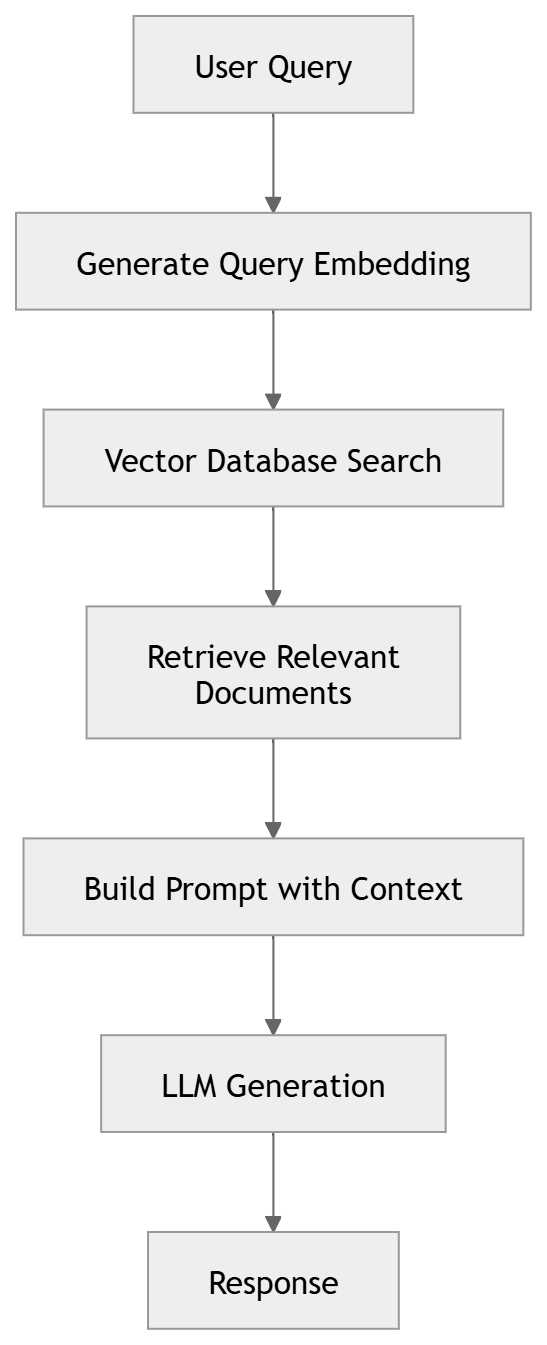
A Typical RAG Pipeline
Many applications use Retrieval Augmented Generation (RAG) to ground responses with external knowledge.
Each request typically involves three steps: embedding generation, vector search, and LLM inference. While embeddings and vector search are relatively inexpensive, LLM inference is the most costly operation, both in latency and token consumption.
What is Semantic Caching?
Traditional caching relies on exact key matches, which rarely work for LLM prompts.
Semantic caching addresses this by comparing the meaning of queries using embeddings rather than relying on exact text matches.
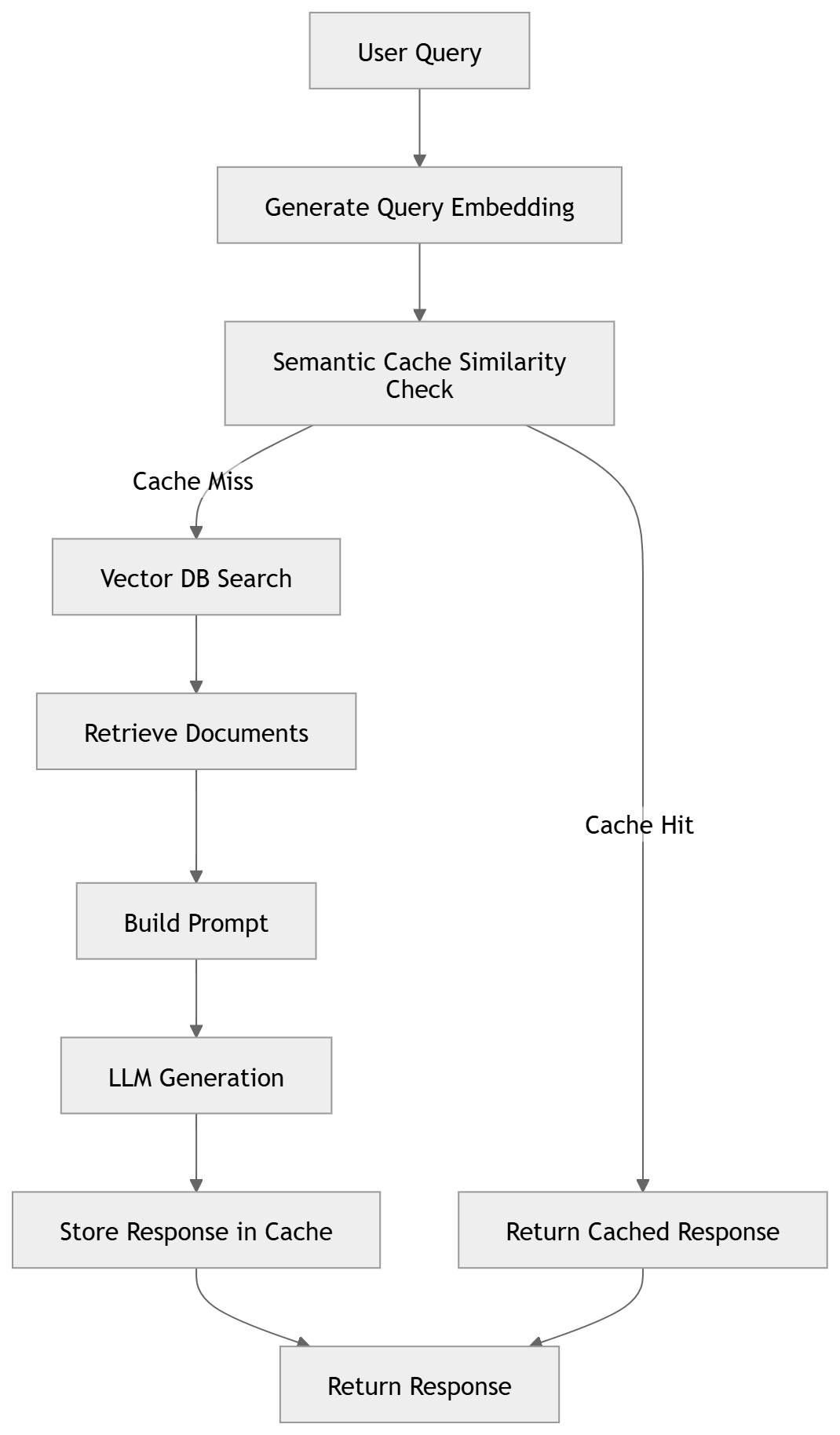
The workflow is as follows:
Convert the query to an embedding
Search the cache for similar embeddings
If a match exists, return the cached response
Otherwise execute the normal pipeline and cache the result
Where Semantic Caching Works Best
Semantic caching is particularly effective in scenarios where similar questions are asked repeatedly with minor variations in wording. Some common examples include:
Customer support chatbots Users often ask the same questions in different ways (e.g., account issues, policies, product details), making them strong candidates for cache reuse.
Knowledge base or documentation assistants Queries about product features, APIs, troubleshooting steps, or documentation content frequently overlap semantically.
Internal enterprise copilots Employees often ask repeated questions about company policies, internal tools, or organizational information.
FAQ-style applications Systems designed around frequently asked questions naturally benefit from semantic reuse.
In these scenarios, semantic caching can help reduce repeated LLM calls, lower token costs, and significantly improve response latency.
RAG with Semantic Caching
When a semantically similar query is found, the system can skip both retrieval and LLM inference, returning the cached response immediately.
Implementation with Semantic Kernel (C#)
Below are code snippets from a small POC implementation (AI-assisted) built using Semantic Kernel with Azure OpenAI models for chat completion and embedding generation. The example uses an in-memory vector store for RAG documents and a simple in-memory cache to demonstrate the semantic caching concept.
Creating an In-Memory Vector Store for RAG Documents
Next, we create an in-memory vector store and upload a few sample documents that will be used for retrieval.
// Create a vector store for RAG documents
var documentVectorStore = new InMemoryVectorStore(new() { EmbeddingGenerator = embeddingGenerator });
using var textSearchStore = new TextSearchStore<string>(documentVectorStore, collectionName: "FinancialData", vectorDimensions: 1536);

// Upsert documents into the vector store
await textSearchStore.UpsertTextAsync(
    [
        "The financial results of Contoso Corp for 2024 is as follows:\nIncome EUR 154 000 000\nExpenses EUR 142 000 000",
        "The financial results of Contoso Corp for 2023 is as follows:\nIncome EUR 174 000 000\nExpenses EUR 152 000 000",
        "The financial results of Contoso Corp for 2022 is as follows:\nIncome EUR 184 000 000\nExpenses EUR 162 000 000",
        "The Contoso Corporation is a multinational business with its headquarters in Paris. The company is a manufacturing, sales, and support organization with more than 100,000 products.",
        "The financial results of AdventureWorks for 2021 is as follows:\nIncome USD 223 000 000\nExpenses USD 210 000 000",
        "AdventureWorks is a large American business that specializes in adventure parks and family entertainment.",
    ]);

// Add text search provider for RAG
var textSearchProvider = new TextSearchProvider(textSearchStore);
agentThread.AIContextProviders.Add(textSearchProvider);
Computing Similarity Between Embeddings
To determine whether a query already exists in the semantic cache, we compare embeddings using cosine similarity. If the similarity exceeds a configured threshold, we consider the queries semantically equivalent.
A high threshold (e.g., > 0.95) typically indicates strong semantic similarity, though the optimal value may require tuning depending on the domain and query patterns.
Note: At the time of writing this post, I did not find a built-in way in Semantic Kernel to directly inspect or filter similarity scores for vector search results, so a custom implementation was used.
// Helper function to calculate cosine similarity between two embeddings
float CalculateCosineSimilarity(ReadOnlyMemory<float> embedding1, ReadOnlyMemory<float> embedding2)
{
    var vec1 = embedding1.Span;
    var vec2 = embedding2.Span;

    float dotProduct = 0f;
    float norm1 = 0f;
    float norm2 = 0f;

    for (int i = 0; i < vec1.Length; i++)
    {
        dotProduct += vec1[i] * vec2[i];
        norm1 += vec1[i] * vec1[i];
        norm2 += vec2[i] * vec2[i];
    }

    return dotProduct / (MathF.Sqrt(norm1) * MathF.Sqrt(norm2));
}
Implementing Semantic Caching
The following helper method performs semantic cache lookup before invoking the RAG pipeline.
If a semantically similar query already exists in the cache, the stored response is returned. Otherwise, the agent is invoked and the new query–response pair is stored for future reuse.
var semanticCache = new List<CacheRecord>();

async Task<string> GetResponseWithSemanticCaching(string query, double similarityThreshold = 0.95)
{
    var sw = Stopwatch.StartNew();
    try
    {
        Console.WriteLine($"\n[Query]: {query}");

        // Generate embedding for the query
        var embeddingResult = await embeddingGenerator.GenerateAsync([query]);
        var queryEmbedding = embeddingResult[0].Vector;

        // Search for similar queries in the cache
        CacheRecord? bestMatch = null;
        float bestScore = 0f;

        foreach (var cachedItem in semanticCache)
        {
            var similarity = CalculateCosineSimilarity(queryEmbedding, cachedItem.Embedding);
            if (similarity > bestScore)
            {
                bestScore = similarity;
                bestMatch = cachedItem;
            }
        }

        // Check if we found a match above the threshold
        if (bestMatch != null && bestScore >= similarityThreshold)
        {
            Console.WriteLine($"[Cache Hit] - Found similar query (Score: {bestScore:F4})");
            Console.WriteLine($"[Similar Query]: {bestMatch.Query}");
            Console.WriteLine($"[Cached Response]: {bestMatch.Response}");
            return bestMatch.Response;
        }

        Console.WriteLine("[Cache Miss] - No similar queries found in cache");

        // If no cache hit, invoke the agent
        Console.WriteLine("[Invoking Agent]...");
        ChatMessageContent message = await agent.InvokeAsync(query, agentThread).FirstAsync();
        var response = message.Content ?? string.Empty;
        Console.WriteLine($"[Agent Response]: {response}");

        // Store the query-response pair in cache
        var cacheRecord = new CacheRecord
        {
            Key = Guid.NewGuid().ToString(),
            Query = query,
            Response = response,
            Embedding = queryEmbedding
        };
        semanticCache.Add(cacheRecord);
        Console.WriteLine("[Cached] - Query and response stored for future use");
        return response;
    }
    finally
    {
        sw.Stop();
        Console.WriteLine($"[Time Taken]: {sw.ElapsedMilliseconds} ms");
    }
}
Experiment Setup
The following experiment was conducted to observe the behavior of semantic caching.
Component
Configuration
Chat Model
gpt-5-nano
Embedding Model
text-embedding-ada-002
Vector Store
In-memory vector store
Cache Implementation
In-memory list
Similarity Metric
Cosine similarity
Similarity Threshold
0.95
Dataset
Sample financial and company information documents
Execution Environment
Local machine
Experiment Results
#
User Query
Cache Status
Similar Query Found
Similarity Score
Sanitized Response
Total Tokens
Time Taken
1
Where is Contoso based?
Cache Miss
—
—
Contoso is headquartered in Paris
725
6215 ms
2
Where is Contoso located?
Cache Hit
Where is Contoso based?
0.9714
Contoso is headquartered in Paris
—
53 ms
3
What was its expenses for 2022?
Cache Miss
—
—
Expenses for 2022: 162,000,000 EUR
1039
5093 ms
4
What were the expenses in 2022?
Cache Hit
What was its expenses for 2022?
0.9773
Expenses for 2022: 162,000,000 EUR
—
60 ms
5
What were the expenses in 2023?
Cache Miss
—
—
Expenses in 2023: 152,000,000 EUR
778
4373 ms
6
What were the financial results for 2022?
Cache Miss
—
—
Income: 184,000,000 EUR; Expenses: 162,000,000 EUR; Net profit: 22,000,000 EUR
1000
4903 ms
7
What were the financial results for 2023?
Cache Hit
What were the financial results for 2022?
0.9638
Income: 184,000,000 EUR; Expenses: 162,000,000 EUR; Net profit: 22,000,000 EUR
—
281 ms
8
What was its financial results for 2023?
Cache Miss
—
—
Income: 174,000,000 EUR; Expenses: 152,000,000 EUR; Net profit: 22,000,000 EUR
1094
4518 ms
9
give me the financial results for 2023?
Cache Hit
What was its financial results for 2023?
0.9522
Income: 174,000,000 EUR; Expenses: 152,000,000 EUR; Net profit: 22,000,000 EUR
—
52 ms
10
What was Contoso’s income in 2023?
Cache Miss
—
—
Contoso’s income in 2023 was 174,000,000 EUR
838
2474 ms
11
Where is Contoso based?
Cache Hit
Where is Contoso based?
1.0000
Contoso is headquartered in Paris
—
83 ms
Observations
Token consumption eliminated for cache hits (major cost optimization) LLM calls consumed approximately 700–1000+ tokens per query. When a cache hit occurred, the stored response was reused, eliminating the need for an LLM call and avoiding token usage entirely. In high-traffic systems where many queries are semantically similar, even a modest cache hit rate can significantly reduce overall LLM costs.
Significant latency reduction LLM invocations took roughly 2–6 seconds, while cache hits returned responses in 50–80 ms, resulting in responses that were nearly 100× faster.
Semantic similarity works well for paraphrased queries Queries such as “Where is Contoso based?” and “Where is Contoso located?” were correctly matched with a similarity score of ~0.97, allowing the cached response to be reused.
Cache reuse works across slightly rephrased queries For example, “What were its financial results for 2023?” and “Give me the financial results for 2023.” were matched successfully, demonstrating the advantage of semantic matching over traditional exact-key caching.
Vector similarity can produce false positives The query “What were the financial results for 2023?” matched the cached query “What were the financial results for 2022?” with a similarity score of 0.96, resulting in 2022 results being returned for a 2023 query.
Additional validation may be required in real systems Because semantic similarity alone does not always guarantee correctness, production implementations often combine semantic matching with keyword filtering, metadata checks, or hybrid search techniques.
Important Considerations
Similarity Threshold Selection The similarity threshold plays a critical role in determining when a cached response can be reused. A threshold that is too high may reduce cache effectiveness, while a lower threshold increases the risk of incorrect responses being reused.
Risk of Semantic False Positives Vector similarity measures semantic closeness, but it does not guarantee contextual correctness. Queries that differ in critical details such as dates, identifiers, or product names may still appear highly similar in embedding space. Additional safeguards may be needed to prevent incorrect cache reuse.
Hybrid Search for Safer Cache Retrieval Because vector similarity alone can produce false positives, many implementations combine semantic similarity with keyword or metadata filtering. This hybrid approach helps ensure that key tokens such as years, IDs, or entity names match before returning a cached response.
Cache Scope and Authorization Boundaries Cached responses must respect user or tenant boundaries. Responses containing user-specific or tenant-specific data should not be reused across different contexts. One approach is to segment the cache by user, tenant, or authorization scope so that cached responses are only reused within the correct boundary.
Production-Ready Vector Storage The example implementation uses an in-memory cache and vector store for simplicity. In production systems, scalable vector-capable stores such as Redis (with vector similarity search), Azure AI Search, or PostgreSQL with pgvector are typically used. These systems provide persistent storage, indexing, and efficient similarity search for large embedding datasets, enabling semantic caches to scale to high query volumes.
Cache Expiration and Data Freshness Cached responses may become stale as underlying data changes. Introducing TTL (time-to-live) policies or invalidation mechanisms helps ensure that responses remain accurate over time.
Final Thoughts
As LLM applications scale, optimizing latency and cost becomes critical. Semantic caching is a simple technique that can significantly reduce repeated LLM calls by reusing responses for semantically similar queries.
While experimenting with Semantic Kernel, this turned out to be one of the most practical optimization techniques to implement.