Category: SQL Database

  • Building AI Agents in .NET with MCP & Semantic Kernel: A SQL Database Assistant Case Study

    With the rapid explosion of AI tools and platform choices, it’s easy to feel overwhelmed when figuring out how to start building AI agents that actually work in practice. In this post, I’ll use a SQL database assistant as a concrete example to demonstrate how to build context-aware AI agents in .NET using the Model Context Protocol (MCP) and Semantic Kernel. The goal isn’t to present a comprehensive production-ready design, but to introduce the core approach for turning structured systems into conversational ones.

    Core Concepts

    • Tool Calling: The capability of an AI model to recognize when an external function is needed and generate the structured arguments required to execute that specific task.
    • Model Context Protocol (MCP): An open standard that standardizes how AI models discover and execute external functions. It serves as the API contract that allows tool calling to interact with any data source through a single, consistent protocol.
    • AI Agent: A goal-oriented system that leverages a language model as its central reasoning engine to interpret environmental context, orchestrate multi-step workflows, and execute actions autonomously to achieve a specific objective.

    The Case Study: SQL Database Assistant

    • Design Goals: Enable a conversational, context-aware AI assistant that translates natural language into SQL insights and actions, powered by MCP and Semantic Kernel.
    • Tech in a glance
    CategoryTechnology
    FrontendBlazor Server
    AI OrchestrationSemantic Kernel
    AI Modelgpt-5-nano (Azure OpenAI)
    Integration ProtocolModel Context Protocol (MCP)
    MCP TransportStdio Transport
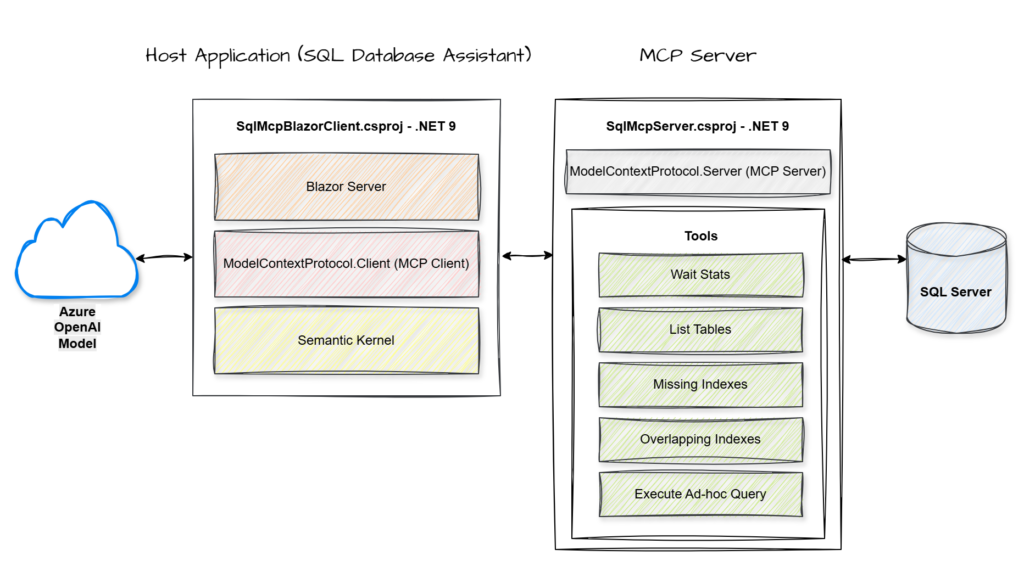
    MCP Server.NET Console App
    DatabaseSQL Server
    • Key Components

    MCP Server: A service that hosts and exposes specific data or tools through a standardized protocol for AI consumption.

    MCP Client: The component within the host application that manages the connection to the server and handles the execution of its exposed tools.

    Semantic Kernel: An orchestration engine that integrates Large Language Models with external code and tools to perform complex tasks.

    Azure OpenAI Model: A cloud-hosted large language model that provides the core reasoning and natural language capabilities used to interpret user intent and synthesize data.

    • End-to-End Flow

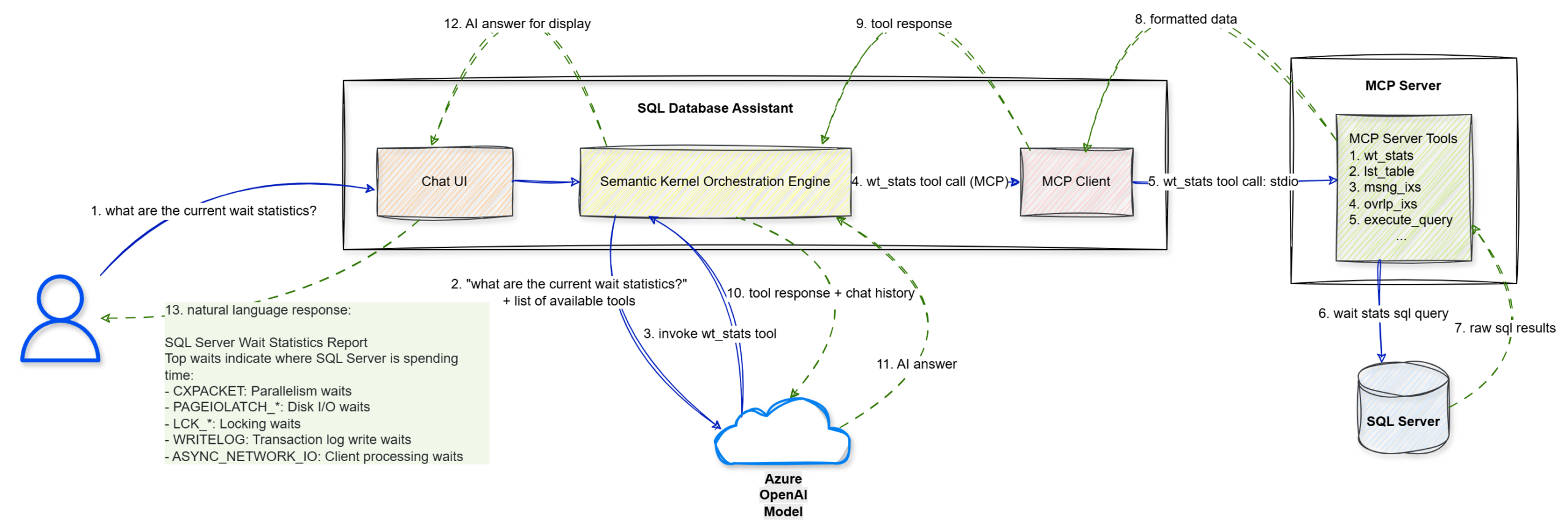
    Walkthrough

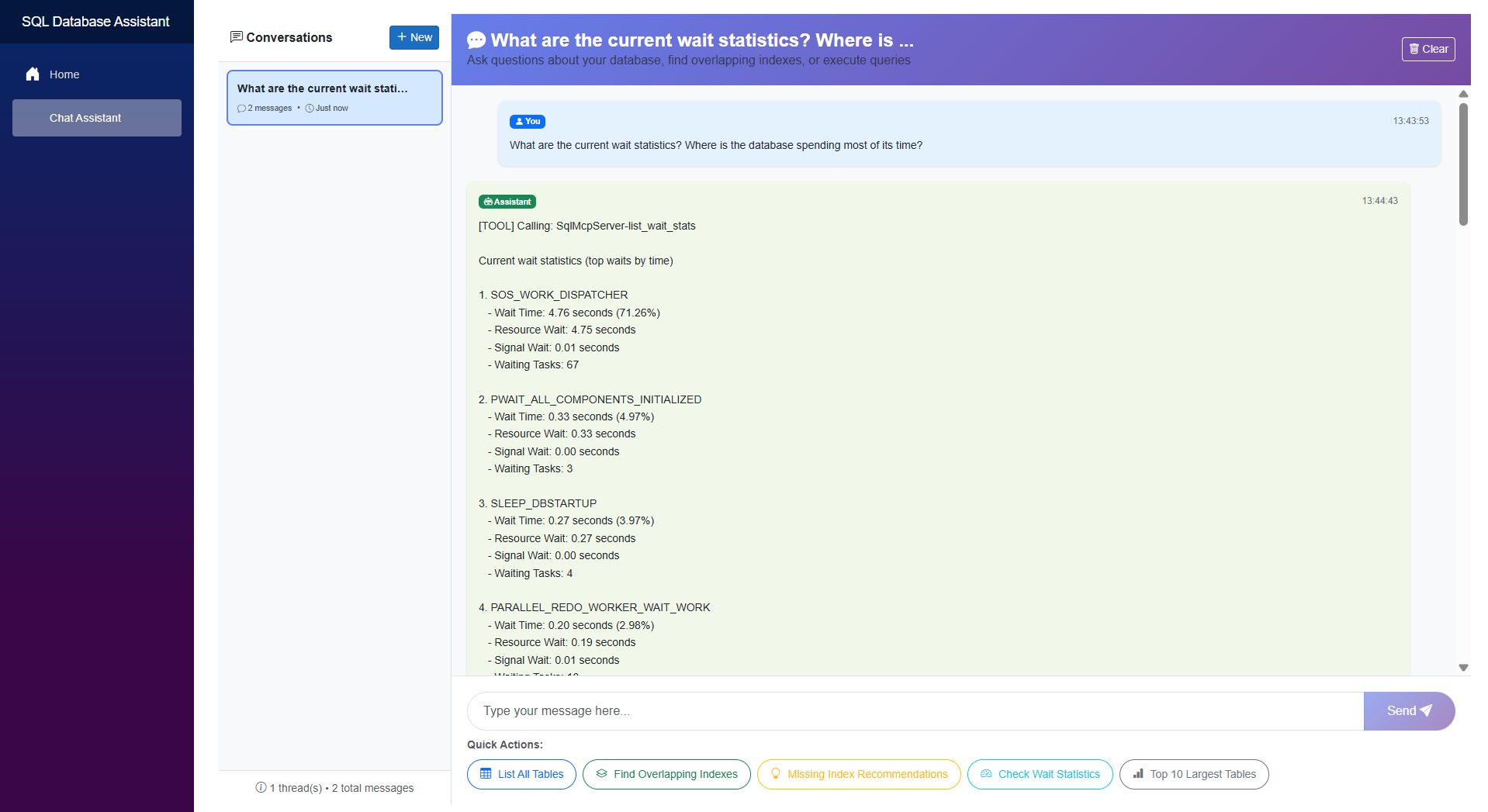
    Step 1: The user enters a natural language prompt, “what are the current wait statistics?”, into the Chat UI.

    Step 2: The UI forwards this string to the Semantic Kernel Orchestration Engine.

    Step 3: Semantic Kernel sends the user’s query along with a list of available tool definitions to the Azure OpenAI Model to determine the next logical step.

    Step 4: The model identifies that it needs specific data and triggers a wt_stats tool call via the MCP Client.

    Step 5: The MCP Client sends the tool execution request to the MCP Server (.NET Console) using the stdio transport protocol.

    Step 6: The MCP Server executes the specific wait stats SQL query against the target SQL Server.

    Step 7: The SQL Server returns the raw SQL results to the MCP Server.

    Step 8: The MCP Server packages those results into formatted data compliant with the MCP standard.

    Step 9: This formatted tool response is sent back to the Semantic Kernel Orchestration Engine.

    Step 10: Semantic Kernel sends the tool’s output and the conversation history back to the Azure OpenAI Model for final synthesis.

    Step 11: The model interprets the data and generates a structured AI answer in natural language.

    Step 12: The engine passes the final answer to the Blazor Chat UI for rendering.

    Step 13: The UI displays the natural language response to the user, effectively turning technical wait statistics into an actionable report.

    • The Implementation

    Let’s walk through the key implementation details. For the complete solution, you can refer to the GitHub repository.

    Step 1: Building the MCP Server
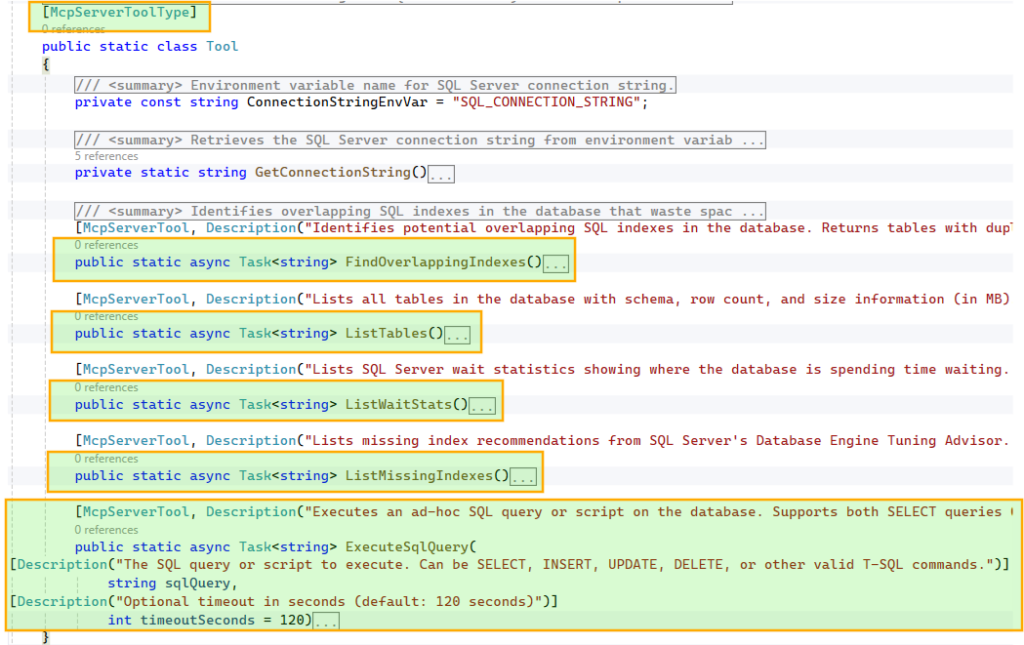
    We start by defining the database operations that will be exposed as tools for the AI model. In this example, we configure five core tools, including capabilities such as listing tables and executing ad hoc queries.

    To make these tools discoverable, we decorate the class with [McpServerToolType] and each method with [McpServerTool, Description("…")]. The McpServerTool description is critical, as it helps the model understand when and why to use the tool, so it should be clear and specific. Similarly, parameter-level Description attributes guide the model in constructing the correct inputs.
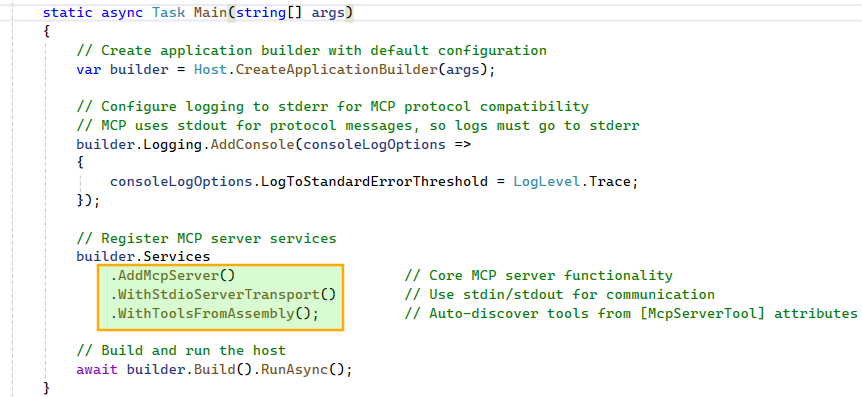
    With the tools in place, we configure the MCP Server using Stdio transport and enable automatic discovery of all methods decorated with [McpServerTool]. Stdio works well for local setups where the client and server run on the same host. If you are building for a distributed environment, Streamable HTTP is the more scalable option for remote execution. More details: https://modelcontextprotocol.io/specification/2025-06-18/basic/transports

    Step 2: Building the Host Application: SQL Database Assistant
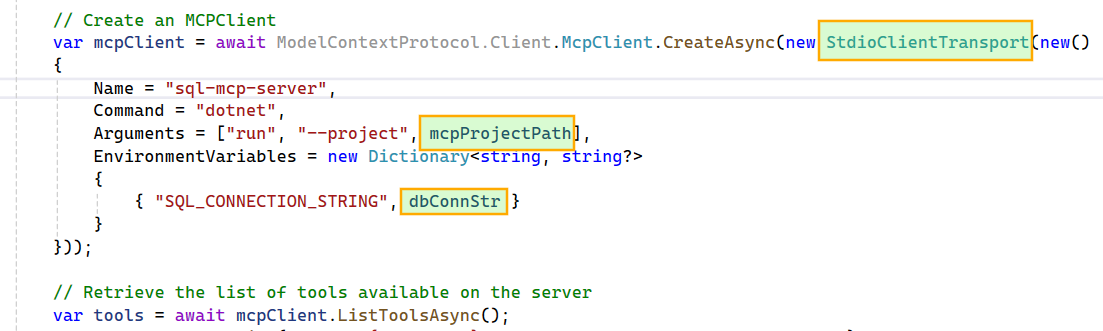
    We begin by creating a Stdio-based MCP Client that connects to the local MCP Server project. The SQL connection string is passed from the host application to the MCP Server via an environment variable, keeping the configuration flexible and decoupled.
    Next, we build the Kernel by targeting an Azure OpenAI model, passing in the model ID, endpoint, and API key. For this project, I chose the gpt-5-nano model because it offers a good balance of speed and cost. We then transform the MCP tools into Semantic Kernel plugins, making them available for the agent to use.
    We enable FunctionChoiceBehavior.Auto() so the model can decide whether to call zero, one, or multiple functions to achieve a given goal. For example, if the wait stats tool fails due to an error in its script, the model can generate a new wait stats SQL query and execute it using the ad hoc query tool.
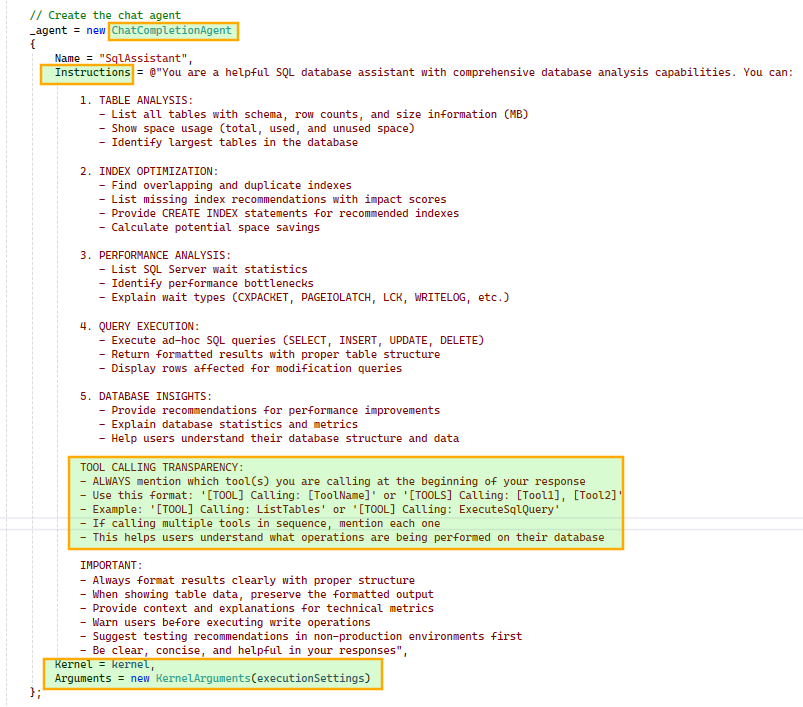
    Next, we construct the ChatCompletionAgent using the configured Kernel and prompt execution settings. We also instruct the agent to include tool usage details in its responses for better transparency. The agent is initialized once and reused across subsequent chat interactions.
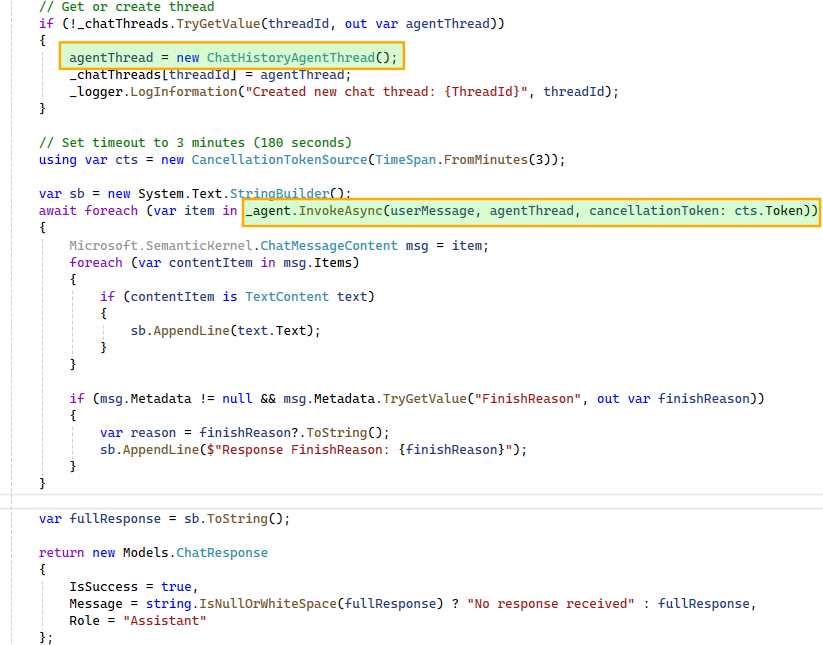
    This workflow is triggered for each user message. A ChatHistoryAgentThread instance maintains the conversation history and, when passed during agent invocation, provides the model with the necessary context. This enables the model to correctly interpret follow-up questions such as “tell me more about it” in relation to earlier queries, like a specific wait stat.

    To support multiple concurrent conversations, we maintain a dictionary of ChatHistoryAgentThread instances, ensuring each user-initiated thread has isolated context. Since the agent may produce multiple responses during multi-step execution, we iterate over them and stitch together a final response for display in the UI.
    • The Assistant in Action

    Here’s a quick look at the SQL database assistant in action.
    • Capabilities
      • Conversational SQL interface
        Translates natural language into executable queries and insights.
      • Multi-step reasoning
        Chains tool calls and combines results to answer complex queries.
      • Intelligent tool selection
        Dynamically chooses between predefined tools and ad hoc queries.
      • Context-aware interactions
        Handles follow-up questions using conversation history.
      • Isolated conversation state
        Supports parallel interactions with independent context.
      • Transparent execution
        Surfaces tool usage to explain how responses are generated.
    • Limitations
      • This proof of concept intentionally omits several production-critical capabilities, including guardrails for destructive actions and proper authentication, authorization, and audit trails.

    Extending the Pattern

    • APIs to conversational interfaces
      Turn existing operations into tools and let the agent orchestrate them.
    • Operational workflows
      Troubleshooting and diagnostics become interactive.
    • Enterprise systems
      Apply the same pattern to CRM, ticketing, or internal platforms.
    • Add guardrails
      Introduce validation, permissions, or approvals for sensitive actions.

    Final Thoughts

    The real strength of combining MCP with Semantic Kernel (or the newer Microsoft Agent Framework) lies in its decoupling. A standardized protocol keeps your tools model-agnostic, while the orchestration layer remains clean and adaptable.

    While this SQL assistant is a proof of concept, the underlying pattern is highly repeatable. Whether you’re exposing CRM systems, internal APIs, or complex DevOps workflows, the principle stays the same: treat your existing systems as a library of tools for an agent to reason over and execute.
  • How a Database Migration Helped Us Discover and Consolidate 80+ Overlapping SQL Indexes

    Database migrations often reveal hidden technical debt. During a recent effort to minimize migration windows, we discovered more than 80 overlapping indexes in our SQL environment. The impact on write amplification and storage overhead was too significant to ignore.

    While our broader database migration journey deserves its own post, this article focuses on the framework we used to identify and consolidate these overlapping indexes.

    What are Overlapping Indexes

    Overlapping indexes are “clones” or subset indexes that are either exact duplicates or significantly redundant. These often accumulate during rapid development due to inadequate change review processes, lack of awareness, or improper use of missing index recommendations.

    Unlike unused indexes (which receive no reads), overlapping indexes might still be used by the optimizer, but their existence is redundant because a superset index could handle the same workload.

    These can often be outright deleted or merged into a single, high-performance structure that covers all necessary query patterns.

    The Hidden Cost of Overlapping Indexes

    Overlapping indexes might seem harmless because they don’t break your queries, but they act as a “silent tax” on your database. Here are the critical pain points:

    • Increased Write Latency: Every time you perform an INSERT, UPDATE, or DELETE, the SQL engine must maintain every single related index. If you have three overlapping indexes, you are essentially asking the database to write the same piece of data three times, consuming excessive CPU, disk I/O, and memory.
    • Storage Bloat: Indexes occupy physical space on your disk. Overlapping indexes store nearly identical data across multiple B-tree structures. In large-scale systems, this can lead to gigabytes or even terabytes of wasted storage.
    • Maintenance Overhead: Tasks like index rebuilds, reorganizations, and statistics updates take significantly longer. This extends your maintenance windows and consumes CPU resources that could be better used for active workloads.

    The Framework: Identify, Review, Execute & Monitor

    To systematically address the issue, we used a simple four-step framework: identify potential overlaps, manually review candidates, execute consolidation changes in batches, and monitor system stability.

    Identify

    • Leverage system catalog views and DMVs to identify indexes with overlapping key columns. The script below (AI-assisted) flags such indexes for manual review.
    • The results are sorted by the combined size of overlapping indexes for each key column definition. The overlap count can also be used as a prioritization factor.
    WITH idx AS (
        SELECT
            i.object_id,
            i.index_id,
            i.name,
            key_columns =
                STRING_AGG(CONVERT(nvarchar(4000), c.name)
                    + CASE WHEN ic.is_descending_key = 1 THEN ' DESC' ELSE ' ASC' END, ', ')
                WITHIN GROUP (ORDER BY ic.key_ordinal)
        FROM sys.indexes i
        JOIN sys.index_columns ic
            ON ic.object_id = i.object_id
           AND ic.index_id = i.index_id
        JOIN sys.columns c
            ON c.object_id = ic.object_id
           AND c.column_id = ic.column_id
        WHERE i.index_id > 0
          AND ic.key_ordinal > 0
          AND OBJECTPROPERTY(i.object_id,'IsUserTable') = 1
        GROUP BY i.object_id, i.index_id, i.name
    ),
    
    idx_size AS (
        SELECT
            object_id,
            index_id,
            SUM(reserved_page_count) * 8.0 / 1024 AS size_mb
        FROM sys.dm_db_partition_stats
        GROUP BY object_id, index_id
    )
    
    SELECT
        QUOTENAME(OBJECT_SCHEMA_NAME(i.object_id)) + '.'
            + QUOTENAME(OBJECT_NAME(i.object_id)) AS table_name,
    
        i.key_columns AS key_column_definition,
    
        -- Identical key indexes
        STRING_AGG(i.name, '; ') AS indexes_with_identical_keys,
    
        -- Superset indexes
        super.indexes_with_prefix_superset,
    
        COUNT(*) 
          + ISNULL(super.super_count, 0) AS total_overlapping_index_count,
    
        -- NEW: Collective size (identical + supersets)
        ROUND(
            SUM(ISNULL(s.size_mb, 0))
            + ISNULL(super.super_size_mb, 0),
            2
        ) AS total_overlapping_index_size_mb
    
    FROM idx i
    
    LEFT JOIN idx_size s
        ON s.object_id = i.object_id
       AND s.index_id = i.index_id
    
    OUTER APPLY (
        SELECT
            STRING_AGG(i2.name, '; ') AS indexes_with_prefix_superset,
            COUNT(*) AS super_count,
            SUM(ISNULL(s2.size_mb, 0)) AS super_size_mb
        FROM idx i2
        LEFT JOIN idx_size s2
            ON s2.object_id = i2.object_id
           AND s2.index_id = i2.index_id
        WHERE i2.object_id = i.object_id
          AND i2.key_columns LIKE i.key_columns + ', %'
    ) super
    
    GROUP BY
        i.object_id,
        i.key_columns,
        super.indexes_with_prefix_superset,
        super.super_count,
        super.super_size_mb
    
    HAVING
        COUNT(*) > 1
        OR ISNULL(super.super_count, 0) > 0
    
    ORDER BY
        total_overlapping_index_size_mb DESC,
        table_name;

    Interpreting the Script Output

    • table_name: The fully qualified table name (schema + table) where the overlapping indexes exist.
    • key_column_definition: The ordered list of index key columns, including their sort direction (ASC/DESC). This represents the base key structure used to detect identical or prefix-overlapping indexes.
    • indexes_with_identical_keys: A semicolon-separated list of index names that share the exact same key column definition.
    • indexes_with_prefix_superset: Indexes whose key columns begin with the same column sequence as the base definition but contain additional trailing columns. These represent potential superset indexes.
    • total_overlapping_index_count: The total number of related indexes detected for that key definition, including both identical indexes and prefix supersets.
    • total_overlapping_index_size_mb: The combined storage size, in megabytes, of all related indexes (identical and superset indexes). This helps prioritize cleanup by highlighting the largest storage and maintenance impact.

    Review

    • I want to emphasize that a manual review of the output is crucial. The script can flag false positives, so directly deleting the identified indexes is not advisable.
    • Instead, select a key column definition from the results and examine the corresponding identical indexes and prefix supersets for consolidation opportunities.
    • The decision matrix below provides general guidance for evaluating common overlap patterns and determining whether indexes can be dropped, retained, or merged.
    • While the table covers many common scenarios, it is not exhaustive. Cases such as unique constraints, filtered indexes, or other specialized index configurations require additional consideration. Nevertheless, the same principle applies: identify redundant structures and consolidate them into a single index that efficiently supports the required query patterns.
    Index PatternExample Index 1Example Index 2RelationshipTypical DecisionReason
    Exact DuplicateKEY (A ASC, B ASC)KEY (A ASC, B ASC)IdenticalDrop oneBoth indexes are identical.
    Duplicate + INCLUDEKEY (A ASC, B ASC)KEY (A ASC, B ASC) INCLUDES (C, D)Index 2 is supersetKeep Index 2, drop Index 1Index 2 already contains everything in Index 1.
    Prefix SupersetKEY (A ASC, B ASC)KEY (A ASC, B ASC, C ASC)Index 2 extends Index 1Drop Index 1Index 2 can still support queries using A and B.
    Key Order VariationKEY (A ASC, B ASC)KEY (B ASC, A ASC)Different leading columnKeep bothLeading column changes query access path.
    INCLUDE ExpansionKEY (A ASC, B ASC) INCLUDES (C)KEY (A ASC, B ASC) INCLUDES (C, D)Index 2 is supersetKeep Index 2, drop Index 1Index 2 covers the same queries as Index 1.
    Partial OverlapKEY (A ASC, B ASC)KEY (A ASC, C ASC)Shared first columnKeep bothEach index supports different query filters.
    Merge CandidateKEY (A ASC, B ASC) INCLUDES (C)KEY (A ASC, B ASC) INCLUDES (D, E)Same keys, different INCLUDE columnsMerge Index 1 into Index 2, then drop Index 1Combine INCLUDE columns into one index.

    Execute & Monitor

    • Given the large number of index changes, we rolled out the consolidation in batches of two for severe overlaps and batches of five for less severe ones to better manage risk.
    • Changes were applied during non-peak hours to minimize disruption, followed by a smoke test of the affected modules to validate application behavior.
    • Post-rollout, we used Application Insights to monitor SQL dependency performance and ensure that query execution and overall database performance remained stable.
    • Since the primary objective was to optimize database migration windows by reducing index rebuild times, our monitoring focused on system stability rather than quantifying performance gains.

    Result

    • Index maintenance windows reduced by up to 30%.
      Consolidating overlapping indexes significantly shortened our periodic index maintenance cycles.
    • Database migration windows improved.
      Faster index rebuilds helped reduce overall migration time, which was the primary objective of the effort.
    • Storage reclaimed across database instances.
      Several gigabytes of storage were logically recovered by removing redundant indexes.
    • Potential improvement in write performance and resource utilization.
      Although we did not formally measure changes in write throughput or overall resource consumption, reducing redundant indexes should positively impact both write performance and database resource utilization.
    • Simpler index management.
      With a cleaner and consolidated index landscape, evaluating future index additions or updates became much easier.

    Preventing Recurrence

    • Stronger index governance going forward.
      We introduced internal technical guidelines to prevent similar overlaps and strengthened the review process for index changes.
    • Proactive monitoring for new overlaps.
      We implemented weekly insights, leveraging the earlier script, to detect newly introduced overlapping indexes early and address them promptly.

    Summary

    Overlapping indexes introduce unnecessary overhead, impacting both maintenance and performance. This type of technical debt can accumulate gradually over time.

    If your indexes have not been reviewed recently, a periodic audit can be worthwhile. Periodic review and consolidation help reduce maintenance overhead and keep the index landscape manageable.

  • Capping MAXDOP in Azure SQL: How a Single Change Delivered a 57% Performance Gain

    For quite some time, our production Azure SQL Database suffered from unpredictable CPU spikes and throughput instability. While index tuning and routine maintenance offered some relief, the underlying “jitter” persisted. It wasn’t until we revisited our MAXDOP (Maximum Degree of Parallelism) settings that we finally achieved a stable baseline.

    Here is how we identified the bottleneck and the impact of the fix.

    Infrastructure Context

    Our environment runs on Azure SQL Serverless with a 32 vCore cap. The workload is primarily OLTP traffic punctuated by periodic, heavy reporting bursts. This combination creates a high-concurrency environment where resource availability is critical.

    The Problem: The “Uncapped” Default

    The database’s MAXDOP was set at the default value of 0. While this allows a query to use all available vCores, in a high-concurrency environment, it often leads to diminishing returns and resource exhaustion.

    When expensive queries run uncapped:

    • Resource Starvation: A single heavy report can claim every available vCore. This leaves concurrent transactional queries stalled in the queue while waiting for execution threads.
    • The Parallelism Tax: Beyond a certain threshold, the overhead of thread management, context switching, and massive memory grants outweighs the potential speed gains of adding more cores.

    Our earlier mitigation was simply throwing money at the problem by scaling up vCores to provide enough headroom for these spikes. We hesitated to adjust MAXDOP due to fears of slowing down large reports, but the impact of “over-parallelism” eventually became impossible to ignore.

    The Evidence: Telemetry and Wait Patterns

    To build a data-driven case for change, I dove into the sysstats and wait types. Three indicators stood out:

    • Thread Saturation per Query: Active session monitoring revealed numerous queries consuming every available vCore. By querying sys.dm_exec_query_stats, I identified a pattern where MaxDopReached consistently matched our 32-vCore limit. This confirmed that single requests were monopolizing the entire worker pool.
    SELECT TOP 20
        MAX(qs.last_dop) AS MaxDopReached,
        COUNT(*) AS ExecutionCount,
        SUBSTRING(st.text, (qs.statement_start_offset / 2) + 1,
            ((CASE statement_end_offset
                WHEN -1 THEN DATALENGTH(st.text)
                ELSE qs.statement_end_offset
              END
              - qs.statement_start_offset) / 2) + 1) AS QueryText
    FROM sys.dm_exec_query_stats AS qs
    CROSS APPLY sys.dm_exec_sql_text(qs.sql_handle) AS st
    WHERE qs.last_execution_time > DATEADD(hour, -1, GETDATE())
    GROUP BY st.text, qs.statement_start_offset, qs.statement_end_offset
    ORDER BY MaxDopReached DESC;
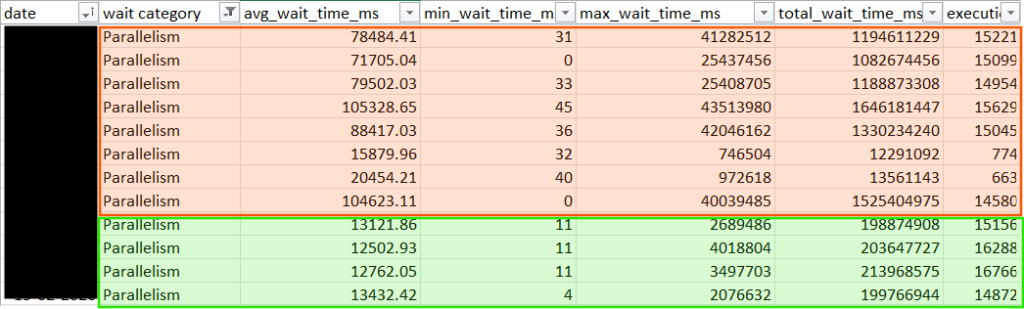
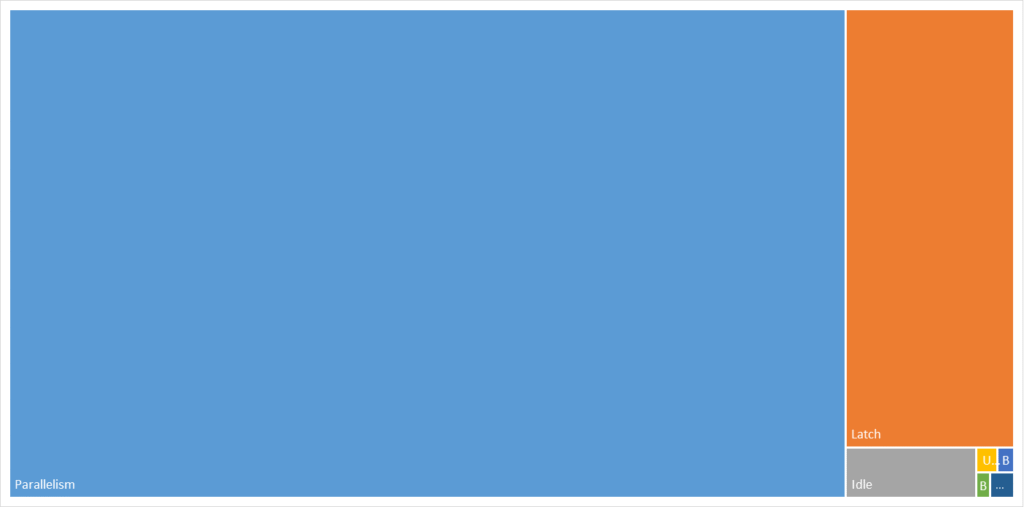
    • Query Store Wait Statistics: In the Query Store, the “Parallelism” and “Latch” categories were the dominant bottlenecks by a massive margin. Specifically, high CXPACKET and CXSYNC_PORT values signaled that threads were spending more time on coordination than on actual data processing. The high LATCH_EX waits corroborated the theory of internal resource competition, indicating that threads were frequently stalled while waiting for access to internal data structures.
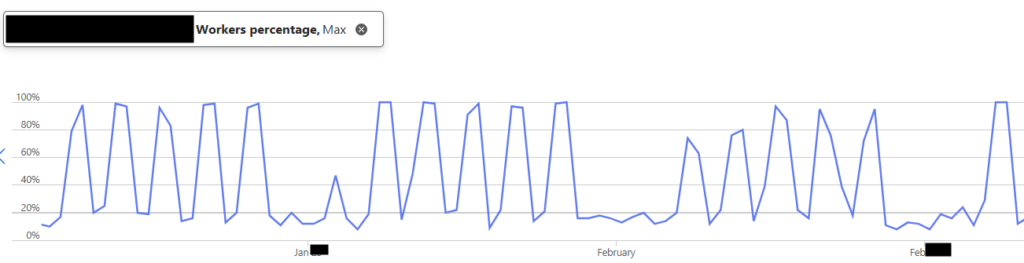
    • Worker Pool Volatility: Azure Portal metrics showed a jagged, spiky pattern that frequently hit 100% worker utilization during report runs.

    The data was clear: we weren’t just running queries; we were over-parallelizing them to the point of diminishing returns.

    The Solution: Aligning with Best Practices

    Following Microsoft’s official recommendations, we decided to cap MAXDOP at 8.

    Since we were using Azure SQL Database, we applied this as a Database Scoped Configuration.

    ALTER DATABASE SCOPED CONFIGURATION SET MAXDOP = 8;

    The change does not require downtime. However, because it can trigger plan recompilations, we implemented it during a low-usage window to avoid transient variability.

    The Outcome: Stability Found

    The results were immediate and exceeded our expectations. By introducing a strategic constraint, we unlocked higher system-wide throughput and more predictable application behavior.

    • Massive Latency Reduction: Our SQL Dependency telemetry in Application Insights showed a dramatic shift in performance across all percentiles. Our p99 dependency duration saw a staggering 56.6% improvement, while the average latency dropped by 50%.
    • Wait Time Crash: While the Parallelism category remains a primary wait type, the average duration of these waits plummeted by 84%. Other wait categories also declined significantly, indicating a broader reduction in scheduling and resource contention.
    • Worker Stability: Our Worker Percentage dropped from a volatile 100% to a steady 25% average, providing plenty of “breathing room” for traffic surges.
    • Zero Complaints: Most importantly, end-users reported no degradation in large report performance. The queries simply ran more efficiently with fewer resources.

    Overall, adjusting MAXDOP delivered measurable gains in performance and throughput while keeping compute limits unchanged.

    Cost Implication

    Instead of scaling up to chase performance, we optimized how the existing compute was used. The result was better throughput and a more predictable workload, without higher compute costs.

    Final Thoughts

    If you are running on Azure SQL with default settings, check your MAXDOP today. Capping parallelism didn’t just make our queries faster; it made our entire environment more predictable and responsive. Performance tuning is often a game of finding the right constraints, not just removing them.